Deals that may land under £500, including voucher or membership caveats. Prices and eligibility can change quickly, so use these as checked notes and recheck the retailer before buying.
Compare the compromises under £500
More memory helps with several apps at once; it does not fix software compatibility. Compare the processor platform, storage and required accessories as well as the price. A few current options are below, with the full offer cards after the comparison.
At £179, the 14-inch 1920×1200 IPS display makes this a useful low-cost browser and schoolwork option. Its 4GB RAM and 64GB UFS storage suit a small number of tabs and cloud files, not heavy multitasking or Windows software.
Know before buying: No charger supplied: budget for a compatible 65W USB-C PD adapter. Only 4GB RAM and 64GB UFS storage; this is ChromeOS, not Windows. Check local click & collect availability, physical UK keyboard layout and the exact ChromeOS support end date before buying.
Core i3-N305 · 8GB RAM · 256GB eMMC · 14-inch Full HD IPS
£269
Price recorded
At £269, 8GB RAM and a Full HD IPS screen make this a practical browser, study and streaming step up from a 4GB Chromebook. The 256GB storage is eMMC, not an SSD, and ChromeOS is not a substitute for Windows-only software.
Know before buying: 8GB RAM and 256GB eMMC storage are onboard and cannot be upgraded. ChromeOS only: check essential apps and the exact Google automatic-update deadline. A 45W USB-C adapter and UK backlit keyboard are listed for this exact model; confirm local Argos stock, delivery and final total.
Intel Core 3 · 8GB RAM · 128GB SSD · 14-inch Full HD
£299
Price recorded
A £299 entry-level 14-inch laptop with 8GB memory and a 128GB SSD. It fills a lower-budget gap for light everyday tasks, but limited storage and the extra charger cost matter more than untested battery-life claims.
Know before buying: Charger not included: budget for a compatible adapter. 8GB RAM and 128GB storage limit heavier multitasking and local files. Exact Core 3 model, operating-system edition, physical UK keyboard layout and warranty duration are unconfirmed; check them before ordering. Retailer stock is not independently confirmed.
Core 3 100U · 8GB RAM · 256GB eUFS · 15.6-inch Full HD AMOLED
£434.99
Price recorded
An AMOLED-screen Chromebook for browser work and streaming at an advertised £434.99. Its 8GB memory is for lighter multitasking; choose Windows or macOS instead if your work needs their desktop applications.
Know before buying: Chrome OS, not Windows; check application compatibility and the exact model’s update-support end date. 256GB eUFS storage, not a conventional SSD. Retailer stock, physical UK keyboard and supplied charger are unconfirmed; a one-year warranty is advertised.
Current Under £500 deals
Some links are affiliate links. We may earn commission at no extra cost to you. About our links
At £179, the 14-inch 1920×1200 IPS display makes this a useful low-cost browser and schoolwork option. Its 4GB RAM and 64GB UFS storage suit a small number of tabs and cloud files, not heavy multitasking or Windows software.
Know before buying No charger supplied: budget for a compatible 65W USB-C PD adapter. Only 4GB RAM and 64GB UFS storage; this is ChromeOS, not Windows. Check local click & collect availability, physical UK keyboard layout and the exact ChromeOS support end date before buying.
Price and availability may change. Confirm the seller, selected model and final price before buying.
Core i3-N305 · 8GB RAM · 256GB eMMC · 14-inch Full HD IPS
At £269, 8GB RAM and a Full HD IPS screen make this a practical browser, study and streaming step up from a 4GB Chromebook. The 256GB storage is eMMC, not an SSD, and ChromeOS is not a substitute for Windows-only software.
Know before buying 8GB RAM and 256GB eMMC storage are onboard and cannot be upgraded. ChromeOS only: check essential apps and the exact Google automatic-update deadline. A 45W USB-C adapter and UK backlit keyboard are listed for this exact model; confirm local Argos stock, delivery and final total.
Price and availability may change. Confirm the seller, selected model and final price before buying.
Intel Core 3 · 8GB RAM · 128GB SSD · 14-inch Full HD
A £299 entry-level 14-inch laptop with 8GB memory and a 128GB SSD. It fills a lower-budget gap for light everyday tasks, but limited storage and the extra charger cost matter more than untested battery-life claims.
Know before buying Charger not included: budget for a compatible adapter. 8GB RAM and 128GB storage limit heavier multitasking and local files. Exact Core 3 model, operating-system edition, physical UK keyboard layout and warranty duration are unconfirmed; check them before ordering. Retailer stock is not independently confirmed.
Price and availability may change. Confirm the seller, selected model and final price before buying.
Core 3 100U · 8GB RAM · 256GB eUFS · 15.6-inch Full HD AMOLED
An AMOLED-screen Chromebook for browser work and streaming at an advertised £434.99. Its 8GB memory is for lighter multitasking; choose Windows or macOS instead if your work needs their desktop applications.
Know before buying Chrome OS, not Windows; check application compatibility and the exact model’s update-support end date. 256GB eUFS storage, not a conventional SSD. Retailer stock, physical UK keyboard and supplied charger are unconfirmed; a one-year warranty is advertised.
Retailer page price before checkout reduction: £719.98
Advertised Costco member checkout price £479.98; retailer headline £719.98, with a £240 difference. Confirm the reduction and £479.98 total in your basket. Shipping included subject to postcode restrictions; membership costs extra if needed.
Price and availability may change. Confirm the seller, selected model and final price before buying.
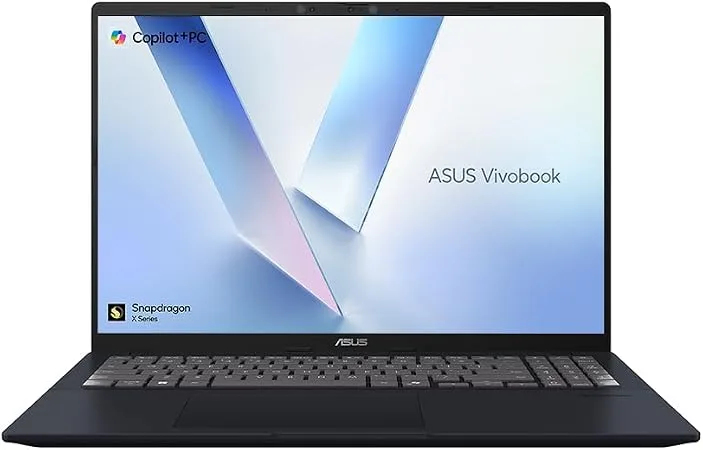
At the advertised £479.98 checkout price, 16GB RAM and a 1TB SSD provide more file space than a 512GB configuration. A useful member option if your apps work on Windows on ARM.
Know before buying Costco membership required; advertised £479.98 at checkout against the £719.98 headline. Confirm the reduction before paying. Windows on ARM needs app/driver checks; basic-colour screen and non-backlit UK keyboard. Confirm the charger.
A compact £399.99 Windows-on-ARM option for light browsing, documents and travel, with a 14-inch 1920×1200 IPS screen. The advertised two-year guarantee is useful, but 8GB RAM and a 256GB SSD limit heavier multitasking; check your apps before choosing Snapdragon.
Know before buying Windows on ARM: check specialist apps, drivers and games. Limited 8GB RAM and 256GB storage. Two-year guarantee and free standard delivery or click & collect are advertised. Physical UK keyboard layout, charger contents and RAM upgradeability are unconfirmed.
Price and availability may change. Confirm the seller, selected model and final price before buying.
Core 5 120U · 8GB RAM · 512GB SSD · 17.3-inch Full HD
A recorded £479.99 buys a roomy 17.3-inch Full HD screen and a 512GB SSD for home-office or family use. The 8GB RAM suits lighter multitasking; choose a 16GB alternative for heavier work rather than paying only for screen size.
Know before buying 8GB RAM limits heavier multitasking; memory upgradeability is unconfirmed. At 2.1kg this is more desk-friendly than travel-friendly. Power supply and one-year manufacturer guarantee are listed. Retailer stock, delivery charges and physical UK keyboard layout are unconfirmed.
Start with the work you need it to do. For browser tabs, documents and video calls, compare memory, storage and the screen before paying for a processor name. A low headline price can hide a small drive, soldered memory or a dim display. Check the exact model number: similarly named versions often have different panels and memory.
Compare the amount you actually pay, including delivery, membership and any required code. A refurbished business laptop can be worth considering alongside a new budget model, but check battery condition, warranty, keyboard layout and the included charger. Do not subtract trade-in or cashback from money due at checkout.
If no current offer appears here, use the linked budget and condition guides to decide your minimum specification. Waiting for an appropriate configuration is usually more useful than buying an unsuitable machine because its advertised discount is large.